

THRIVE Guides
For Writers/Researchers/Contributors These are infographic guides for anyone involved in publishing content on the THRIVE blog. They cover our style guide, how to use WordPress, what to expect, and everything else you need to know. To use the guides, simply click on the relevant image to see more details about each step. PLEASE NOTE: By default, new authors are published under a generic THRIVE Publishing name. To progress to publishing under your own name, please ensure to follow each step of the publishing process and meet all of the appropriate guidelines. This means meeting submission deadlines, producing quality content, following our SEO requirements, and writing according to our style guide and standards.
Table of Contents
Publishing Process and Guide


Each month, THRIVE focuses its content on a specific campaign. These campaign themes are based around the sustainable development goals (SDGs). You can view our upcoming campaign schedule here.
Writers should pitch ideas for articles they wish to write based on upcoming themes. The research team also holds campaign meetings at the beginning of each month to discuss topics that should be covered. Anyone is free to join this meeting.
If a writer does not have their own ideas to pitch, topics may be assigned to them based on the brainstorming from the campaign meeting.
To pitch a topic click here and fill in the form. To avoid pitching a topic that has already been covered (or is currently being written) make sure to use the blog search tool. You can also see what other people are writing about here – approved pitches are highlighted in green.
NOTE: When you research articles for pitches, you may use articles you find (that are not of your current topic) to create further pitches.
It is important that you do not wait for feedback on a current article before beginning the next. Aim to write two articles per month at a minimum, and note that you can pitch many months in advance if you would like to.

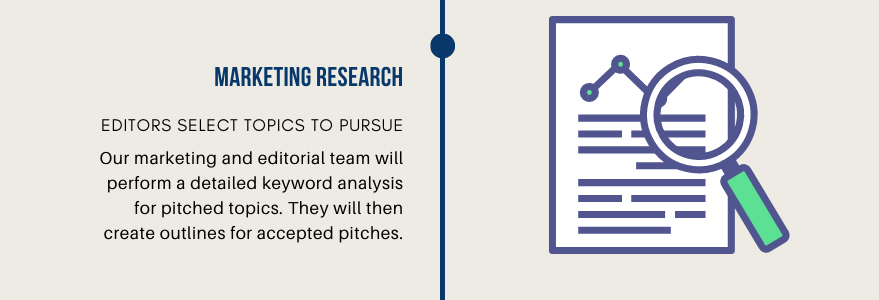
This section of the guide covers the specific details of how the marketing and editorial team will perform a keyword analysis of a pitched topic and create an outline for it. Writers and researchers do not need to perform this step, it will be done for them.
To perform a keyword analysis, look at the pitched topics and select one. First, make sure that the topic does not cover the same content as another article that THRIVE has produced, or is in the process of producing. You can use the blog search tool to check.
Use the suggested title from the pitch form as a short-tail primary keyword to be your starting point. In this example, our keyword will be “Sustainable Tourism”.
Use Ubersuggest to identify high-volume search queries. Login details are available on slack.
For the keyword “Sustainable Tourism” the following were the most common terms based on search volume:
- Responsible tourism
- Green tourism
- Sustainable tourism examples
- Green destinations
- Types of sustainable tourism
- Sustainable tourism management
- Sustainable travel companies
Additionally, if you cannot find relevant search terms for your topic, try to form your long tail keywords based on what search queries you want your content to be found for.
Long Tail keywords are more descriptive, and they add more context to the short tail keywords. For example, for the primary keyword ‘sustainable tourism’ you could use the following long tail keywords:
Contextual: Sustainable Tourism strategies
Questions: How ecotourism can help travellers be more sustainable
Micro-moment searches: Best ways to be a sustainable tourist/ Sustainable tourist guide
These keywords need to be organically integrated into a blog post for search engines to serve the page to users in search results. As such, you can provide a list of the most relevant keywords for the writer, so they know to include those terms in their article.
Going back to the topic of ‘Sustainable Tourism’ you can do the following:
The title should contain one of these keywords e.g. What can travel companies do to ensure responsible tourism in 2021
Each article will need an efficient and logical structure to enable search engines to crawl it efficiently. Create headers based on the keyword analysis that will serve as a guide for writers to complete their article. Per our example, these are headers that could be used for the blog post on sustainable tourism:
- What is responsible tourism
- Green tourism defined
- Examples of Sustainable Tourism in 2021
- Top 5 Green Destinations in Australia
- What are the different types of sustainable tourism
- The best sustainable tourism companies
Writing an Effective Title
“5 times as many people read the headline as they do the body”
To improve our chances of gaining more traffic through Social Media, we need to have a great title that grabs our audience’s attention. We need to engage our audience rather than be passive. Some headline styles include:
1. Start headlines with Numbers
This makes people curious. It allows for easy content structure and makes it easy for people to read so they can scan through the X number of points.
Examples include:
- Top 15 Businesses Who are Killing it in Sustainability
- 21 Things You Can Do to Become More Sustainable
- 7 Secrets, 7 Proven Ways, 7 Reasons, 7 Tips…
- 7 Ways to Make a Positive Impact on Your Carbon Footprint
2. Use ‘how to’ headlines
This is a great way to show that your blog is answering an issue your audience may have. This is more for articles that guide people. Examples include:
- How to Make Your Business More Sustainable Without Losing Customers
- How to XXX even if XXXX
- How to XXX to {solve a problem}
- How to Create an At-Home Compost to Help Your Community
3. Flag Common Mistakes
This creates curiosity so they read the blog to see if they made that mistake. It helps them to solve their problem. Ask questions that your audience would be interested in, for instance:
- 16 Assumptions on Hunger you’re probably making (and how to fix them)
- Are you making these 10 common google adwords mistakes?
- Do You Know The Real Cost of Our Gadgets?
4. Engage people, get them into the content
What is A Circular Economy? We Dig in Deep
Think You Know Your Carbon Footprint? Quiz Yourself and Find Out
5. Use Punctuation
This is particularly useful for SEO. Place your keyphrase before the colon and add your benefit after
Marketing Plan Template: Create Your First Marketing Plan in 5 Steps
Coronavirus on Marine Life: What are long-term effects?
6. Be ultra-specific
Define what the article is about. Set the expectation for the rest of the article
An example of a bad headline = Fast Fashion
An example of a good headline = Fast Fashion: What is the real impact on our environment
7. Use the 5Ws
These are interrogative words used to gather info.
Who – Who do we hold accountable when there’s not enough climate action?
What – What are climate change modelling impacts?
When – How to motivate yourself when you don’t feel like it
Where – Where does the waste of all our gadgets end up?
Why – Why moving towards a green hydrogen economy benefits us all
Some tips:
Model the best in the business. See how successful bloggers/NGOs are writing their titles and modify them so you can use them yourself in a different way.
Practice. You’ll get better as you go.
You can use this tool as a base for your titles.
Try and write at least 10 variations of the headline. See which works best. Post in the #content thread in Slack and see what others think works best.
Use the search terms and questions revealed by the keyword analysis to create headings and structure the outline. This should naturally create a more optimised article. Create this outline in WordPress and also paste it into the editorial notes so that editors can check that it has been followed.
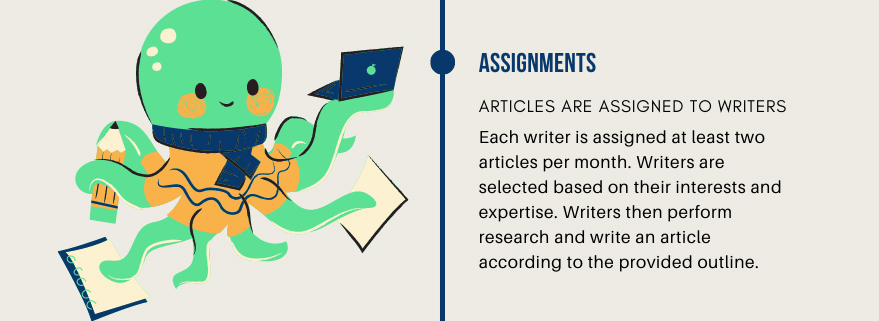
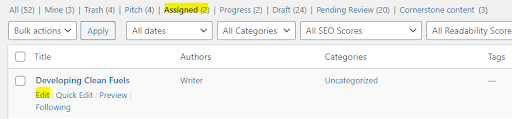
When a pitch has been accepted and an outline created, an article will be created in WordPress and assigned to a writer. To view your assigned topics, log in at blogpost.strive2thrive.earth with your WordPress credentials and select Posts on the left-hand menu and go to Assigned.
You may begin writing on these topics by selecting Edit and adding in your content. Change the status of the post to Draft once you start writing.
Make sure you join the appropriate channels on slack for our latest communications: #blogs, #content, #research, and #helpwanted
Unassigned articles are frequently listed in the #helpwanted channel on Slack, writers and researchers can choose to be assigned these articles on a first come, first served basis.
Note: If you wish to work with another writer, you may add them as a co-writer through WordPress’s settings menu within your post.
To write your posts you can either work on a word processor of your choice and paste it into WordPress once completed or write within WordPress itself. Make sure to follow the outline and keep the title and headings that have been provided for you. Structure your content to be appropriate to these headings. Try to use the keywords provided wherever appropriate. Make sure you insert your primary keywords within the first 100 words of your post.
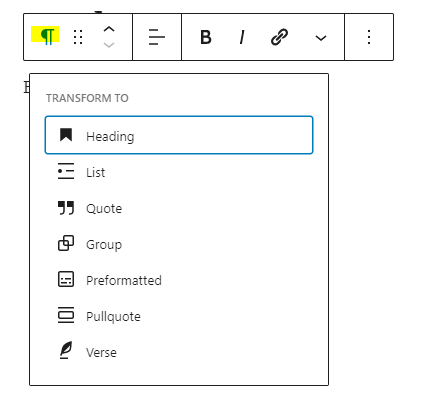
Insert pictures/photos using ‘cut’ / ‘copy’ and ‘paste’ or use the upload option. For headers, lists, or quotes make sure you change the block type to the relevant style as seen in the image below. Link to other THRIVE articles using the hyperlink tool.

When writing the first draft for your article, make sure you follow our style guide. This will ensure that your writing is in line with our style and standards.
Editorial Style Guidelines
THRIVE’s Voice is:
- Conversational
- Trustworthy and authoritative
- Approachable
- Knowledgeable
- Informative
- Community-oriented
Key Principles
Please check the following items BEFORE submitting your article for review. Submitting for review is an indication that your article is polished and ready for publication.
- Write to an audience of a general/knowledgeable audience aged 15 and above
- Aim for a length of 1500 words. Some topics may call for longer or shorter articles or dividing the article into parts
- Write clearly and concisely. Don’t waffle or add unnecessary information
- Do NOT write in the first-person using words like “I,” “me,” or “my.” Instead, write in the third person. The article/blog post should be from the standpoint of an educational and authoritative resource on the topic
- Articles must be your original work and not published elsewhere
- Give credit. Check your facts and quotations. Cite the original sources (not the source that quoted the original source)
- Our Editorial Team reserves the right to edit your article, including grammar, spelling, and formatting
- Personal information, such as email addresses, and personal websites are not permitted
- When presenting data and figures, consider using charts. Sometimes figures can be difficult to digest for readers, so think about ways to make important data more readable, like with an infographic.
- Keep your paragraphs short and break the article into easily digestible sections
- If you feel your article relates to other articles, audio files, YouTube links, or images/charts on the THRIVE Platform we encourage you to include them in your post
- Include hyperlinks to direct readers to other THRIVE articles
- Follow our referencing guide for your article
- Add captions and alt-text using your target keyword for all the images you use and always give credit
- Stay insightful! Readers should feel educated and motivated so they will engage more with the THRIVE platform
- Call to Action: Be sure to link back to the key messages, values, and purpose of THRIVE at the end of your article. This needs to be specific to the content of your article, not a generic call to look at other content on THRIVE blog. Try to connect something you uncovered or discussed within your own work, that connects to something else within our organisation. This can be to other blog articles, or relate directly to actions THRIVE is taking, or to the platform tool itself
- Double-check your work. As a content writer, we’re relying on you to be the expert in your field. Make sure there are no errors in your statements, spelling, or grammar
- Do NOT publish your article. Ensure it is saved as PENDING REVIEW
- Monitor your submissions daily for editorial comments and reach out via the contacts provided (slack/email) for assistance
Writing Your Article
This section acts as a guide on how to write an article. This exists to help your writing become the best it can be.
With this in mind, we wrote this example article plan based on ‘Solutions to Drought’.
By using H1 headings, H2 sub-headings, and H3s, which are smaller than H2s), you can arrange your points clearly and logically – your readers will thank you.
H1: Solutions for Drought: 7 ways to deal with water scarcity
Introduction
– Consider the following points, and write these down:
- Materiality – What the topic is, who it impacts (stakeholders), and why it’s a problem. Consider the economical, environmental, social, and governance issues, and how they affect different stakeholders.
- Multi capital – What kinds of capital are involved in the issue, and how are they affected? Consider financial, plant and equipment, intellectual property, human capital, social relationships with community and primary stakeholders, and renewable and non-renewable natural environmental resources.
- Integrated reporting – Set up discussion of potential solutions, to discuss later.
Discuss and evaluate how potential solutions create value by bringing together the strategy, governance, performance, and prospects to reflect the profit-making, social, and environmental context within which an entity operates.
For example: Discuss the current extent of water scarcity globally. How is it being monitored? Is it getting worse? What is the UN’s commitment to reducing water scarcity?
Below is a sample content plan for an introduction:
H2: What is Drought?
“[The USGS] defines drought as a period of drier-than-normal conditions that results in water-related problems. Drought is characterised by a lack of precipitation, such as rain, snow, or sleet, for a protracted period, resulting in a water shortage.” (If you provide a quote or some info be sure to provide the writer with a link to your source)
H2: How Does Drought Occur?
- Poor water quality
- Seasonal variation (natural causes)
- Excess water demand
- Lower rainfall due to climate change
- Poor water management/water quality
- Lack of technology eg desalination, purification
Body
Once you’ve established the significance in the introduction sections, it’s time to dig into the meat of the article. Firstly, we discuss the SCALE and SCOPE of the problem, then we SHIFT into the solution.
SCALE: What data is relevant? How do we measure it? What research methodologies and information do we include, so that our audience has the data they need to understand the problem and the impacts of potential solutions?
For instance, focus on:
- Finite Resources– Our resources are finite/limited, thus it’s important to measure how much is being used in relation to how much exists. Gauge the impact of how limited resources impact the proposed changes.
- For instance, water is a finite resource, particularly freshwater.
How much is being used vs how much exists – worldwide, and within the more local contexts of drought-afflicted areas. Do the solutions work within those contexts? What other resources do the solutions use? Are they available in those regions?
- For instance, water is a finite resource, particularly freshwater.
- Science-Based– All of our work must be evidence-based, following the best available scientific knowledge and methodologies. We use peer-reviewed research and other theoretical data.
- Always be mindful of copying points from less fact-based sources. Check multiple sources when you can.
- Context-Based– Consider factual, practical data gathered from local, regional, cultural, and other non-theoretical standpoints.
- So, when evaluating a drought solution, we must try to find data relevant to the localities where it will be implemented. If this data isn’t readily available, this should be acknowledged.
SCOPE: How big is the issue? Where does it fit into the bigger picture? Focus on:
- Boundary/Entity– Where should change be directed, based on the data? These should fit between the social floor (minimum needed for survival/happiness), and environmental ceiling (maximum amount we can use before the environment struggles to sustain humanity).
Give your audience a clear, concise understanding of the relevant limits and exclusions.
- Boundary/Entity– Where should change be directed, based on the data? These should fit between the social floor (minimum needed for survival/happiness), and environmental ceiling (maximum amount we can use before the environment struggles to sustain humanity).
- We’ve established how much water exists, both globally and locally. But how much can we use before it becomes unsustainable?
This ties back into the stakeholders (who use the water). How much water needs to remain within local ecosystems for them to continue existing? How much water needs to be used for food production? How much is available to use for that purpose, and is current water use crossing that boundary? What about industry? Here, we seek to establish the minimum water use we need for human happiness and the maximums we can use before we compromise the existence of the natural environment.
- We’ve established how much water exists, both globally and locally. But how much can we use before it becomes unsustainable?
- Strong Sustainability– Emphasise transformations that protect, maintain, or enhance natural resources.
- Of the proposed solutions, which ones are best for protecting the environment?
- Complex Wicked Problems– Focus fearlessly on problems or symptoms with multiple clear or hidden causes that are also difficult or impossible to solve; expect to fine-tune solutions as some problems may become worse as solutions are implemented.
This means recognising that there are many factors at play, and the needs of different stakeholders will likely conflict in many different ways.
No solution is perfect, and it might not even be possible to resolve every issue.
- Complex Wicked Problems– Focus fearlessly on problems or symptoms with multiple clear or hidden causes that are also difficult or impossible to solve; expect to fine-tune solutions as some problems may become worse as solutions are implemented.
- For example, the data might show that using water to grow cotton, particularly in drought-afflicted regions, crosses the boundary limits we earlier established. If the solution becomes to cease growing cotton in those regions, this is going to negatively impact the farmers, industries that use that cotton, it may impact cotton supply globally, affecting clothing prices, maybe impoverished people will have less access to affordable clothing as a result.
Below is a sample content plan for exploring the scale and scope:
H2: What are the Most Drought Prone Countries?
H3: Ethiopia. Poor harvests and recurrent insecurity in some regions of Ethiopia has led to food instability and falling food reserves across the country.
H3: Sudan. About 2.8 million people in Sudan are affected by drought every year.
H3: Eritrea
H3: Afghanistan
H3: China
H3: Pakistan
H3: Iran
H3: Somalia
H2: What are the Solutions for Drought?
- Global response (responsibility – reference SDG6)
- Better access to technology
- Better farming methods (eg Crop selection, water use)
- Water farm management training programmes (provide examples)
- Action on Emissions (Net zero, shift to renewables)
- Water sanitation and hygiene programmes
- Reducing water use. Greater efficiencies in manufacturing and household use
Conclusion
All articles should conclude by describing how we can SHIFT into a thrivable future. What solutions can help solve the problem? How can we act to make the solutions happen?
Lastly, end with a ‘call to action’, showing how the THRIVE Platform / Project / Blogs / can help with solving the problem, or how THRIVE’s goals align with solving the problem. After this, invite Invite the reader to follow us to find out more information on sustainability and the ways to achieve a ‘thrivable future’.
SHIFT: These are the changes that need to happen to bring us into the thrivable zone (between the social floor and environmental ceiling, described earlier).
Focus on solutions that are:
- Values based– Thrivability is based on our core values. Shift from an economical approach to creating products or services, and consider a moral and ethical responsibility to maximise economic, ecological, and social impacts.
- This may mean changing the way we view and use water. It’s vital for all life, and cannot be considered as a purely economical resource.
- Linear to Circular– Change behavioural patterns to reuse materials and reduce waste. Shift from traditionally linear (take, make, waste) to circular (reduce, reuse, recycle) economic concepts.
- For example, reducing our water consumption at all levels, reusing and recycling water AND the things we make that consume water in their production cycle.
- Trans-Disciplinary– Consider the different disciplines that relate to the issue. Collaborate with people from all relevant specialties to achieve universal goals in ways that help everyone, not just a few individuals.
H2: Are there Long Term Solutions for Drought?
Focus on the most important issue of dealing with climate change and the UN commitment to reducing water scarcity. Show how we can be smarter with water use at home and at work.
At the end of your article, end with a ‘call to action’, showing how the THRIVE Platform / Project / Blogs / can help with solving the problem, or how THRIVE’s goals align with solving the problem. After this, invite Invite the reader to follow us to find out more information on sustainability and the ways to achieve a ‘thrivable future’.
In Summary
This is just an example, but our articles should acknowledge the complexity of resolving the issues we raise. This helps demonstrate the importance of systemic and holistic solutions (and evaluations), and also reinforces the core concept of both the THRIVE framework and more globally adopted schemes like the United Nations SDGs.
Lastly, all issues are all related and must be tackled together.
Finalising Your Article
Once you have finished writing your article, add the following requirements under the settings panel on the right side. Keep ALL settings as they are except for the following changes.
- Select relevant categories for the blog post (please don’t create any new categories). Add any relevant tags separated by commas. You must include the appropriate theme as a tag. For example, sdg6 (no spaces). You can do this in the quick edit section in the wordpress dashboard. Try to make sure your tags don’t overlap with categories
- Add alt-text to all images, preferably with your target keywords
- Upload a featured image (size: 900 x 483 pixels) as found in the right-hand panel. It is extremely important that you add a featured image, as this will be the image seen both at the top of your article and in the preview thumbnail on the main blog page. See Featured Image Guidelines for more information on how to select and resize images
- Add alt-text to all the images you use with your primary keywords
- Lastly, ensure your primary keyword is in your meta description as well. Google will highlight your keyword, and associated search terms, when your page is shown as a result to users
Completing this will give your blog a higher chance of ranking on search engines
Additionally, under Quick Edit in the WordPress posts page check the following settings:
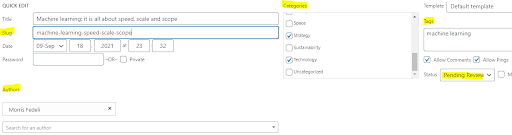
- Ensure the correct Author is listed in the dropdown
- Ensure the publication date is set one year after the actual upload date
- Enter a URL slug. Keep it short and unique, so it doesn’t override another blog post. If the title of the article is short then the slug should ideally be the same.
- Remove any stop words from the slug as well (to, the, he/she, have, etc.)
- If you haven’t done so already, select relevant categories for the blog post (please don’t create any new categories)
- Add any relevant tags separated by commas. You must include the appropriate theme as a tag. For example, sdg6 (no spaces). Make sure your tags don’t overlap with categories
- Change the status of your post to Pending Review
Submitting for Review Checklist
Before transferring your article to PENDING REVIEW, please ensure you complete the checklist, then submit your blog for review, click Schedule on the top right and Submit for Review. Alternatively, you can select Quick Edit from the Posts page and change the status of your blog to Pending Review.
Editors will check your work thereafter. Note that you don’t need to change access to allow editors to look at your work.
Monitor your submissions daily for editorial comments and reach out via the contacts provided (slack/email) for assistance.
Having a consistent series of complete submissions requiring little to no editing or updates will allow you to progress to self-publish status sooner whereby you may publish directly under your own name.
Performing a Peer Review
All researchers are expected to perform a minimum of two peer reviews per month. For many of you, this may even be the first task you are assigned by THRIVE.
A peer review is essentially fact-checking. You will be assigned an article in WordPress, to which you will have edit access. As a peer reviewer, you will also need to check that the sources provided verify the author’s claim and that it has not been misinterpreted.
Any factual claims missing a source should also be pointed out. Each external link needs to be opened in a new tab, and each internal link should open in the same tab. Please double-check this to ensure the URL matches the claim against it.
Researchers are to read the article and make a note with:
- 1. An asterisk in brackets
- 2. A number
It should look like this: (*1) in any place where there is an error or area of improvement to make.
At the bottom of the page, you will find a section for editorial comments. In this section, reference the (*1) comment you are referring to (and use it as a key). You should add additional details for the author to address each thing that should be corrected regarding that specific comment (see image below).
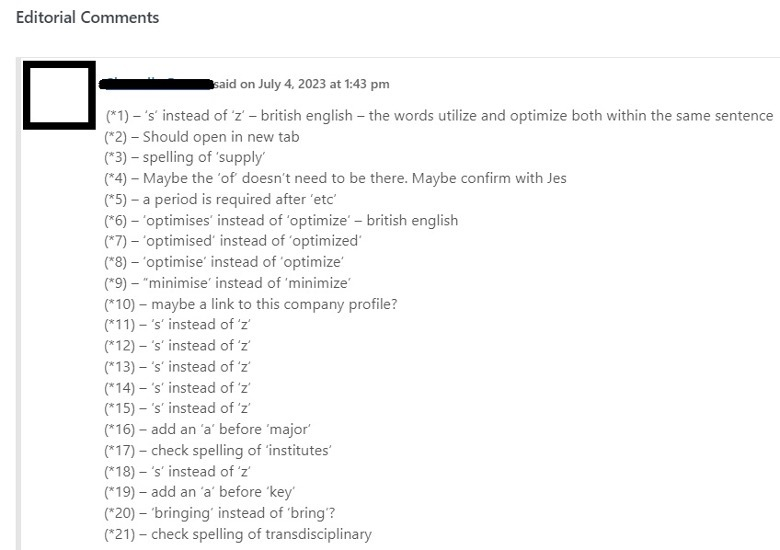
This way, when addressing PR comments, the author can just press Ctrl+F (the FIND tool) and look for the relevant comment.
For example, if the writer wants to address a comment (*10), they can Ctrl+F ‘(*10)‘ and it’ll take them there. Also, if the comment by the Peer Reviewer is not clear, the writer can easily reference the number of the comments and discuss it with the Peer Reviewer for clarity.
Any further comments for the author can be left in the editorial comments box to let them know of any changes they need to make, or if there are none, simply say that a peer review has been completed.
Once You Are Finished
If the article requires changes, set the status of the article back to draft.
If no changes are required, set the status of the article to pending editing. It will then be passed on to a copyeditor to make changes regarding the wording of the article.
We aim for a colloquial yet formal style, making our writing accessible to all. The guide below should be followed to ensure consistency.
To this end, please make sure you follow the style and referencing guides below.
Referencing
- When referencing a source, use inline citation (see below) e.g: Mining lithium is a
- and even competes with local crops production.
- The gender gap in the amount of time spent on unpaid work is worse for poorer countries (
International Labour Organization, 2018
- ).
- A reference list at the end of your article is not necessary unless your article is being published as a journal article on our resources page for experts and researchers in the field
- Use WordPress’s quote blocks for referencing large quotes and give credit to the original source
- Source and give credit to any images taken from external sources using inline citations
- Chose ‘open in new tab’ for external links only
Style Sheet
Spelling and Grammar
- Use the word per cent for singular percentages (one per cent – nine per cent). Use % for percentages 10 and above.
- Contractions are preferable (It’s vs It is).
- Media usage: Capitalise and use quotation marks around Academic articles, Television shows, etc.
- THRIVE: To be written in all capital letters, bold and italics.
Punctuation:
- Single space after a period/full stop
- Quotation marks “double”
- Dashes: closed en, e.g. text–text
- Punctuation after quotes
- Ellipses
- Serial comma (comma inserted before ‘and’ and ‘such as’)
Capitalisation
- Titles
- Headings
- Sub-headings
- Capitalise words following a colon ‘:’
Numbers, measurements, dates and times
- Spell out numbers one through nine; use numerals for 10 and up
- Use a comma in numbers larger than 999, e.g. 1,000
- Use metric
- Dates: 9 January 2021 (no comma)
- Times: 7 am (space, no full stops/periods)
Titles
- Titles should not exceed 70 characters
- Titles must be unique and include the keywords in your title
- Be descriptive of what is contained in the article
Sourcing images:
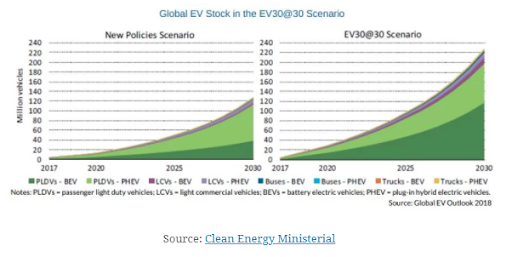
Spellings
General Spelling style is Australian/UK (-ise, colour)
Dictionary: https://dictionary.cambridge.org/
Acknowledgment of Country
If you are presenting a webinar or meeting within Australia, or wish to acknowledge the Traditional Custodians of Australia, please use the following words.
‘In the spirit of reconciliation THRIVE acknowledges the Traditional Custodians of country throughout Australia and their connections to land, sea, and community. We pay our respect to their Elders past and present and extend that respect to all Aboriginal and Torres Strait Islander peoples today.’
Editors can provide direct feedback to your articles through Editorial Comments seen all the way in the bottom of the WordPress text editor of your post. You will be notified by email if an editor has provided any feedback. You can communicate with your editor through here, or in slack.
Accepted articles:
Before you submit, please go through the Final Checks section to make sure there are no issues.
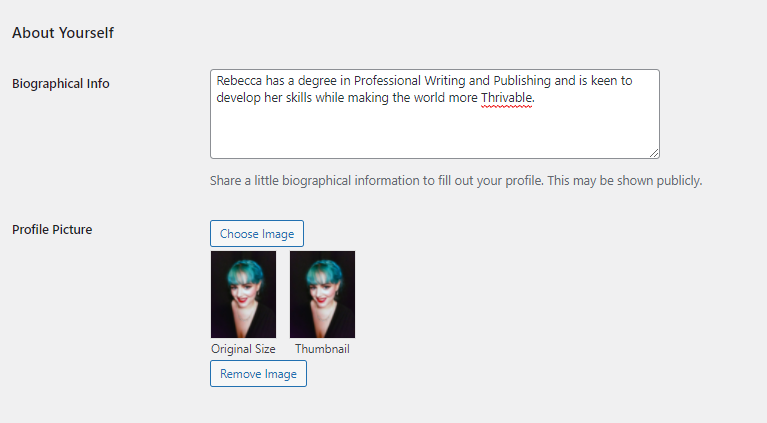
NOTE: You must fill out your author profile (and add a picture of yourself) to publish articles – this only needs to be done once.
THRIVE editors will tolerate and implement minor corrections before passing an article onto the pool of SCHEDULED articles for publication. Once in this pool then the Editor-in-chief will assign dates for the publishing of the same according to a number of factors. You will no longer be able to edit the article past this point.
Rejected Articles:
Articles requiring major corrections, missing key citations/biography or be missing or contain erroneous or unsupported facts, missing links, inappropriate length, styling or grammar, or in some other way not of sufficient quality will be rejected. You will be advised of this by the editor and your article will contain comments indicating where the issues lie. Please fix it promptly and resubmit within two days to avoid the article release date being pushed back.

This is the final stage before your post is published, and it is basically to check that all of the finer details of publishing in wordpress have been attended to. For writers, please ensure that you check these things before submitting for review. Make sure to go through the checklist and tick everything off!
Featured Image Guidelines
A good image is critical to success. It should grab the attention of the viewer and help them understand the essence of what your content has to offer. This featured image is visible as a thumbnail on the main Blog page and is repeated as the main image on the individual blog post. This image should always be:
Unique – Ensure your chosen image hasn’t been used on the THRIVE blog before High quality – Ensure you download the actual image rather than dragging it from the website to your desktop resulting in a low-resolution image – remember it needs to be 900px by 483px
Relevant to the blog post subject – search for keywords mentioned in the blog
Non-offensive – if the blog is about a controversial subject, keep the image vague
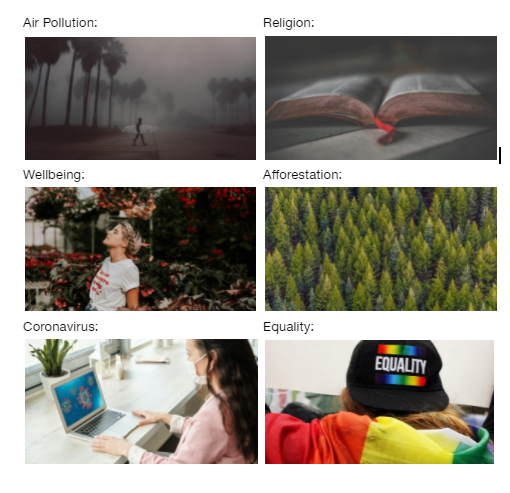
Examples of past blog images:
Where to find high-quality FREE images:
https://www.pexels.com/
https://unsplash.com/
https://search.creativecommons.org/ (ensure that your image doesn’t require you to credit the owner) – on the sidebar, select the first 2 options under “licenses”
How to Resize your Featured image
To ensure all images are equal in size when you visit the blog, please resize your featured image. This can be done within WordPress.
When you’re editing your blog post, in the right sidebar under “Featured image”:- select “Set featured image” and upload your image
Still in the popup, under the uploaded image select “Edit image”
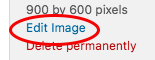
Under SCALE IMAGE, add new dimensions so that the width is 900 (ignore the height for now)
Select the button Scale
You will need to press the back button and reselect your new rescaled image at this point.
Select the “Crop” button in the top left of the popup
Under IMAGE CROP within Aspect Ratio: enter 900 x 483
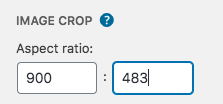
Click on the image and you will now see a dotted rectangle within your image. Drag the bottom right corner to the maximum width. You may need to adjust the selection so the image looks right.

Select “Crop” again to take action.
Press “Save”
Please also change the title of your image so it isn’t the file name.
How to use Yoast SEO WordPress Plugin
Scroll down to the bottom of your text editor, you should see Yoast SEO:
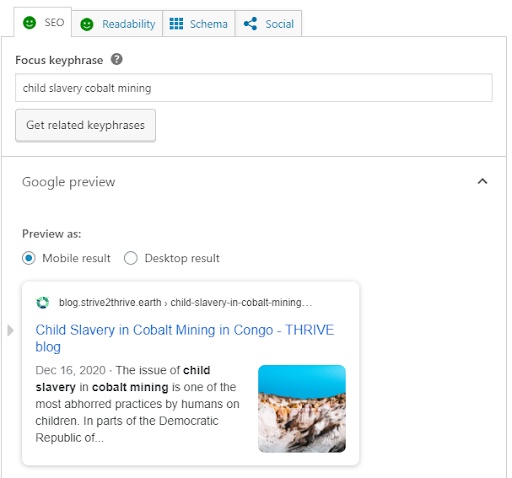
Enter the focus keyphrase of your article into Yoast
Under Google Preview check your SEO title width. The default title for your article will be {Your post title} – {Site title}. Make sure you get a green bar under to ensure it’s of the right length (Orange indicates too short and Red means too long). Your title should be around 60 characters
If your title is too long or short you can either edit your main post title, write a new custom SEO title (this won’t affect your main post title) or remove the {Site title} tag if it’s too long.
If you haven’t done so already, enter your slug (separated by hyphens) which will be the unique URL for your post. This will typically be the title of your article without any stop word. Make sure your keyphrase is in the slug.
Enter a catchy meta description that describes and summarises the contents of your post for users and search engines to know and understand what your content is about. Your meta description should be approximately 155 characters long. Use the green bar under to check if it’s of the right length.
Try to include commonly used keywords and phrases when possible in your meta description.
Use Yoast SEO Analysis to check your article for any SEO related errors
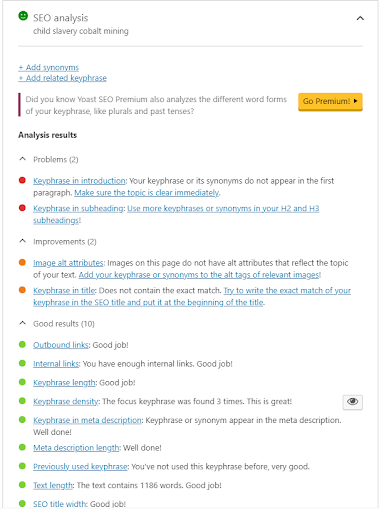
Address any Problems or Improvements by making any changes to your article based on Yoast’s recommendations till you get an overall green dot (or close to).
Remember that having a green dot or not doesn’t generally affect your SEO performance as this tool is just a guide. However, try to ensure you address any issues related to keyphrases. (Yoast sometimes cannot differentiate between different forms of a word e.g. sustainable and sustainability. If you are still getting problems from Yoast after you have already done what it has suggested, don’t worry about it.)
Make sure you get a green dot for “Previously used Keyphrase”. This ensures you are not competing with another article on the blog for rankings.
Avoid linking your keyphrase to an external website, instead link a surrounding word. To get an approved readability score simply click on the highlight tool in Yoast SEO under the readability tab. An overall Green Dot for readability is not necessary but desirable.

Publishing Schedule
Once your article has been approved it will be scheduled for publication based on the Content Calendar. Please note that once your post has been scheduled for publication you will no longer have edit access. Additionally, it may be a few weeks or months before your blog gets published to ensure it fits with THRIVE’s publishing schedule.
To ensure that your article is reviewed and published in a timely fashion, make sure that you are writing about the following month’s theme. For example, in August you should be pitching ideas for September and October. Do not attempt to write about the current month’s theme as it may result in your article being delayed for a year before publication.
It is important that you do not wait for feedback on a current article before beginning the next. Aim to write two articles per month at a minimum, and note that you can pitch many months in advance if you would like to.
Once your article is published we encourage you to share it through your own social media channels. Together by spreading the word on sustainability, we can make the world a THRIVABLE place.

Congratulations! You made it all the way through and have published an article. If you’re new, you will notice that your name doesn’t appear on the article, and the author is credited as “THRIVE Publishing”. This is because newer writers often require more intense work from our editing team. Regular contributors who consistently produce quality work will be given a profile and publish under their own credentials.
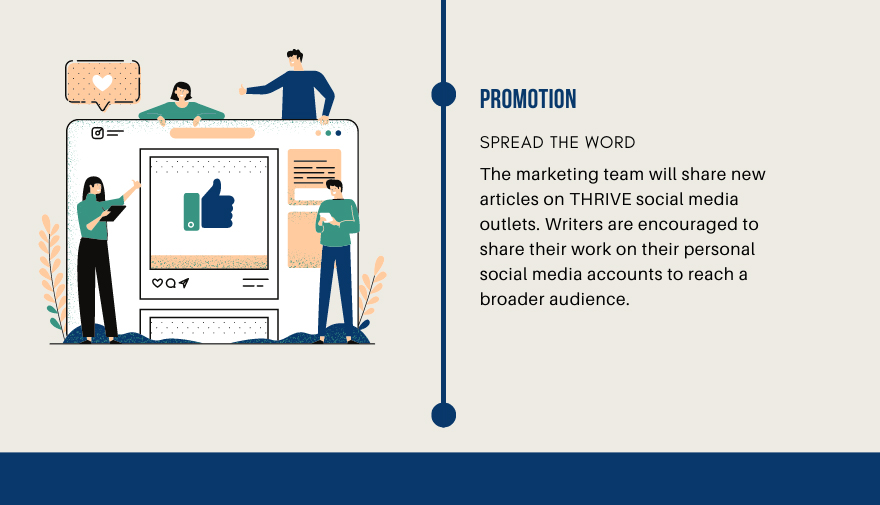
Published posts will appear on the front page of the THRIVE Blog. Star performers (or those who submit a repurposing form) will also have their articles promoted on our LinkedIn, Facebook, Instagram, and Twitter.
Marketing Your Article
‘What you do after you create your content is what truly counts’
– Gary Vaynerchuk
You’ve written your article, edited it, and now it’s done and out in the world. Good job, right? Well…
If you want people to actually read your article, you will need to promote it! The whole point of what we do here is to educate people and spread awareness. That means we need to put in extra effort to bring our content to people.
One of the best ways to start is by submitting a repurposing form. This will help THRIVE’s marketing team use your article to make infographics or video content, to reach an audience that might be less engaged in written content.
You should also make sure to share your published content on your personal social media accounts. Spread the word and get your work out there!
Guide to Using WordPress

Logging In
You can log in to WordPress at ThrivabilityMatters.Org/wp-admin using your WordPress credentials.
Your username will be yourname@strive2thrive.earth and your password will have been assigned to you in your email.
If you have forgotten your password, use the #it-support channel in Slack to request that it be reset.

Assigned Posts
When a pitch has been accepted and an outline created, an article will be created in WordPress and assigned to a writer. To view your assigned topics, log in at blogpost.strive2thrive.earth with your WordPress credentials and select Posts on the left-hand menu and go to Assigned.

Add New Post
To create a new article in WordPress, simply click on the add new post button. This can be found either at the top of your screen when you are signed into the blog.
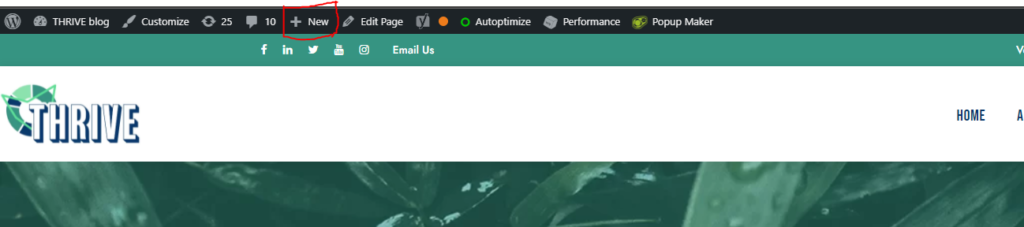
Or in the posts category.
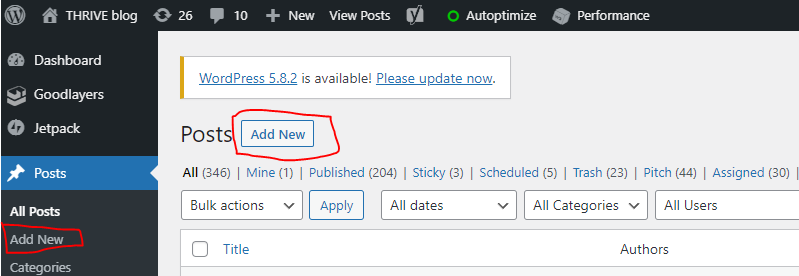

Use The Block Editor
When writing an article in WordPress, it’s important to use the block editor to format your content. You can create a new block by clicking on the plus image and selecting the block type.
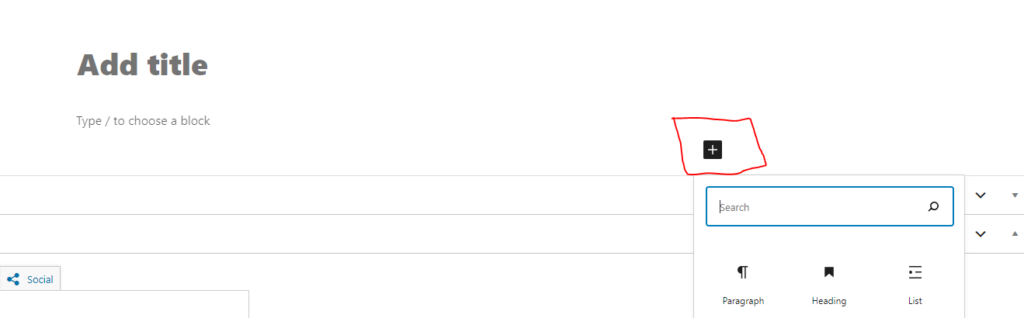
You can also paste text and images directly into WordPress and change the block type like this.
Use WordPress’s quote blocks for referencing large quotes and give credit to the original source

Use The Yoast Plugin
Yoast is a plugin that measures how readable your article is, and how well it meets search engine optimisation standards. Both of these are important, as it makes sure people find your article when searching for your topic on google.
To use Yoast, scroll down to the bottom of your text editor, you should see Yoast SEO:

Change Post Status
After you have created a post, or been assigned one, you will need to change the post status. It should be a draft when you are writing it, and then pending review once you have completed your first draft.
You can change the post status two ways. Either within the post itself, in the menu on the right:
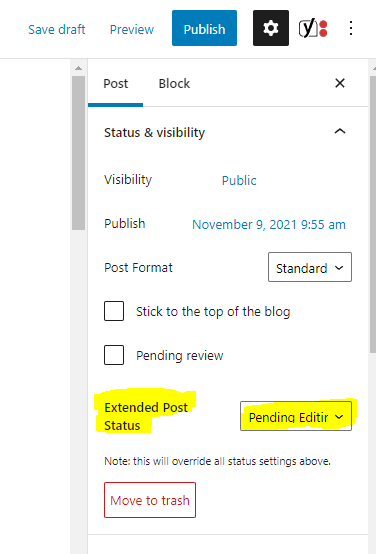
Or using quick edit.

Editorial Comments
When you give and receive feedback for peer reviews or editing, you will use the editorial comments section. It is usually located at the bottom of the page, however sometimes it will be in the side panel on the right.

Fill Out Your Profile
When you give and receive feedback for peer reviews or editing, you will use the editorial comments section. It is usually located at the bottom of the page, however sometimes it will be in the side panel on the right.
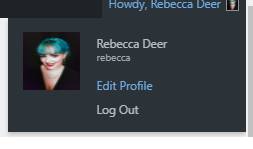
Then simply scroll down and type or paste in your biographical information and upload a profile picture.

Public Comments
You may find that members of the public comment on your article. That’s great!
Such comments will be found at the bottom of your published article.
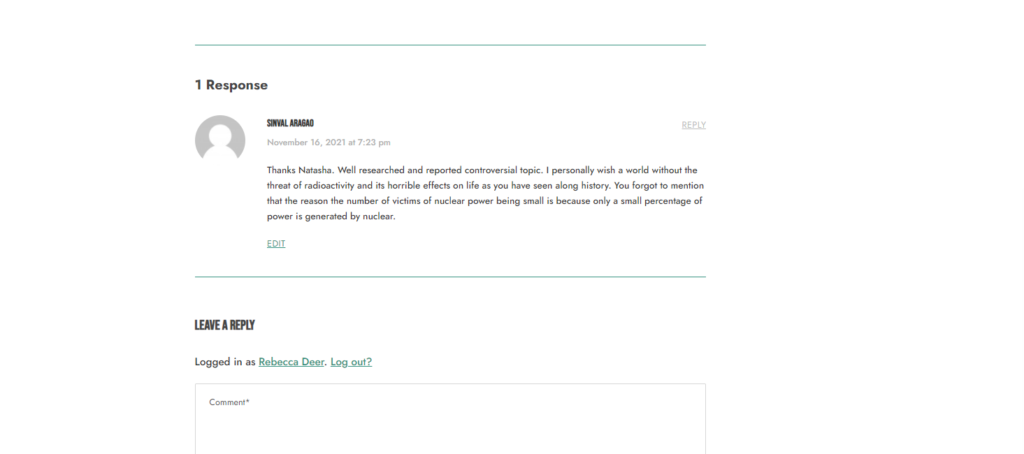
Make sure to take the time to reply, if you receive a comment.

Tips And Tricks
WordPress has a few quirks. At times it might seem like your article has disappeared. If this happens, don’t panic! This usually means that someone else has been assigned to the article, most likely to peer review it. You can still access the article through the direct link, otherwise simply wait for the review to be complete.
Test Your Knowledge
Reinforce your knowledge by taking this quiz on how to use WordPress. Good luck!